From notebook to panel. Bespoke panels and software, built around how your business runs
Admin panels built around how you work: booking systems, order tracking, dealer and B2B portals and integrations. Based in Northern Cyprus.
- Price
- By quoteScope is set out in a written quote
- Timeline
- In the quoteThe first version is kept small
- Interim versions
- On a test addressYou try the panel and comment
- Data
- YoursCode handover is set out in the contract
Spreadsheet, WhatsApp, notebook: three places.
Bookings and orders are scattered across WhatsApp, notebooks and spreadsheets.
FixEverything in one panel; no double bookings, and the history shows who did what.
You build the same report by hand every month.
FixEnquiries, sales and occupancy in weekly and monthly charts; exported to a spreadsheet when needed.
Staff, resellers or agents see either everything or nothing.
FixRoles and permissions: everyone logs into the same panel and sees only their own area.
You copy the same details by hand between payments, shipping and accounting.
FixData flows between the panel and the payment, shipping and accounting software you already use.
What can a panel include?
Booking and appointment calendar
Availability, capacity and working hours in one calendar. Customers pick a free slot themselves, and no slot gets booked twice.
Roles and permissions
Managers, staff and dealers or agencies use the same panel; each person only sees their own area.
Reports
Requests, sales and occupancy in weekly and monthly charts, exportable to a spreadsheet when needed.
Notifications
New requests, confirmations and reminders go out automatically by email, SMS or WhatsApp.
Integrations
Data exchange with payment providers (such as iyzico or PayTR), shipping, accounting and the other software you use.
Sample interface
- Booking, appointment and order tracking panels
- Dealer and B2B panels with custom price lists
- Role-based permissions and activity history
- Payment, shipping, accounting and ERP integrations
- SMS, email and WhatsApp notifications
- Process automation and AI-assisted tools for repetitive steps
Three places,
one panel.
Work scattered across a spreadsheet, messages and a notebook comes together in one panel. An example is Dindi Group: the team runs projects, sales status and form messages from its own panel, no code needed.
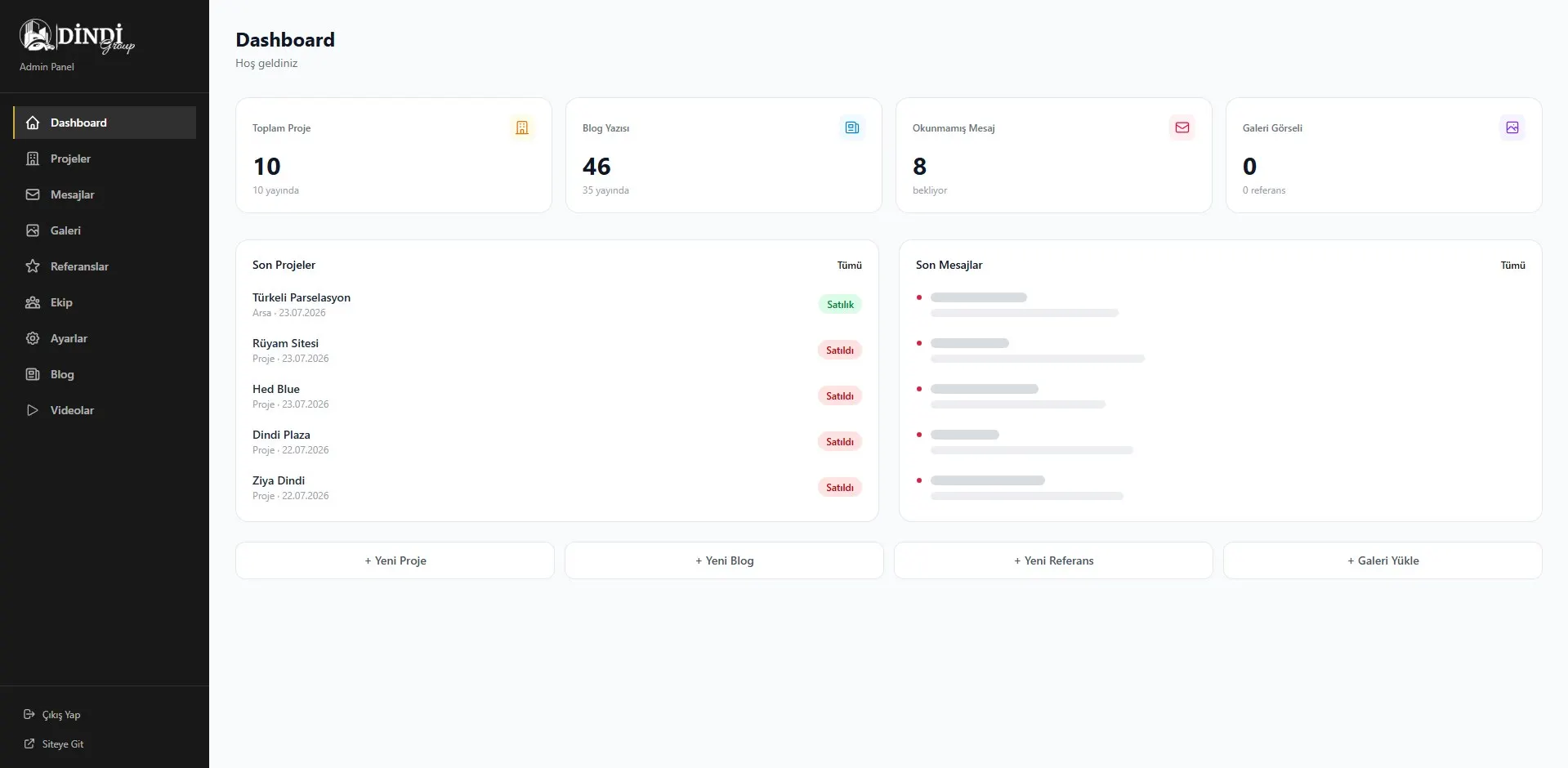
For sale or sold: the status changes once in the panel and on the site too. No more asking who has the latest version.
Real work: Dindi Group. Personal details are hidden. See the project
Four steps from workflow to working panel.
- Map the workflow
Together we map how the work runs today: who does what, in which order.
- Scope and quote
What goes into the first version, the timeline and the price are set out in a written quote.
- Interim versions
During development we open the panel on a test address; if the direction is wrong, we turn early.
- Launch and care
The panel goes live; new fields, reports or steps can be added later.
The timeline depends on scope and is written into the quote. Keeping the first version small and building on it shortens it.
Built around your work, with tools we know.
- Stack
- Next.js
- Tailwind CSS
- Panel
- Roles and permissions
- Activity history
- Connections
- Payments
- Shipping
When off-the-shelf tools fall short.
A good fit if…
- Your processes live in Excel files and WhatsApp groups
- Off-the-shelf software doesn't fit the way you work
- You need to connect systems such as payments, accounting or shipping
Not the right fit if…
- A ready-made booking or e-commerce tool already does the job
- How the work should flow isn't clear yet
If a ready-made tool is enough, we'll say so; bespoke software also needs maintenance.
More detailWhat is a panel for?, Off-the-shelf or bespoke?, Integrations
What is a panel for?
A panel is where the day-to-day running of your business happens. If you take bookings, the calendar lives there. If you take appointments, so does the schedule of staff and time slots. If you take orders, so do the preparation and shipping steps.
A good panel is not measured by how many features it has, but by how much it shortens the daily work. So the first version doesn't try to do everything. It solves the task that takes up the most time.
Off-the-shelf or bespoke?
A ready-made booking, stock or accounting tool does the job for many businesses: the monthly fee is known and set-up is quick. A bespoke panel makes sense when your process does not fit the ready-made tool, when the same data is typed into two or three places by hand every day, or when the tools you already use need to talk to each other. We answer this question together in the first meeting, and if an off-the-shelf tool is enough, we say so.
A live example: the admin panel behind a residential developer's website. Projects, sales status and content are updated by the team themselves from the panel.
Integrations
A panel on its own is often not enough. Payment providers, shipping companies, accounting or ERP software, marketplace accounts, and SMS or WhatsApp notifications all come into play. Once these connections are in place, nobody has to type the same data into two places by hand.
Sectors that run on a panel.
Frequently asked questions
If your question isn't here, get in touch.